Summary and Schedule
Introduction
Web scraping is the process of extracting data from websites. Some data that is available on the web is presented in a format that makes it easier to collect and use it, for example in the form of downloadable comma-separated values (CSV) datasets that can then be imported in a spreadsheet or loaded into a data analysis script. Often, however, even though it is publicly available, data is not readily available for reuse. For example it can be contained in a PDF, or a table on a website, or spread across multiple web pages.
There are a variety of ways to scrape a website to extract information for reuse. In its simplest form, this can be achieved by copying and pasting snippets from a web page, but this can be unpractical if there is a large amount of data to be extracted, or if it is spread over a large number of pages. Instead, specialized tools and techniques can be used to automate this process, by defining what sites to visit, what information to look for, and whether data extraction should stop once the end of a page has been reached, or whether to follow hyperlinks and repeat the process recursively. Automating web scraping also allows to define whether the process should be run at regular intervals and capture changes in the data.
This lesson gives an introduction to the structure of websites, introduces some tools to extract data from well-structured websites and discusses the legal and ethical implications of extracting and using that data.
Overview
Questions
- What will be covered in this training?
Objectives
After attending this training, participants will be able to:
- Understand the structure of a webpage and its underlying source code
- Identify different methods of gathering data from a webpage
- Use the Web Scraper browser extension to extract data from webpages
- Assess the legal and ethical implications of using data gathered from a webpage
- This lesson does not assume any previous knowledge about web scraping
- Participants should be able to use a web browser
Data
The sample html files and spreadsheets generated from the scraping exercises can be downloaded from Intro-to-web-scraping-data.zip.
License
This is a new lesson built with The Carpentries Workbench.
It is adapted from the UC Santa Barbara Library Introduction to Web Scraping Course under CC-BY 4.0.
| Setup Instructions | Download files required for the lesson | |
| Duration: 00h 00m | 1. What is Web Scraping? |
What is web scraping and why is it useful? What are typical use cases for web scraping? |
| Duration: 00h 20m | 2. Anatomy of a web page |
What’s behind a website, and how can I extract information from
it? How can I find the code for a specific element on a web page? |
| Duration: 01h 05m | 3. Manually scrape data using browser extensions |
How can I get started scraping data off the web? How do I assess the most appropriate method to scrape data? |
| Duration: 01h 50m | 4. Ethics and Legality of Web Scraping |
When is web scraping OK and when is it not? Is web scraping legal? Can I get into trouble? What are some ethical considerations to make? What can I do with the data that I’ve scraped? |
| Duration: 02h 35m | Finish |
The actual schedule may vary slightly depending on the topics and exercises chosen by the instructor.
Software Setup
For this lesson, we will use a Chrome browser extension to get started with web scraping.
- Please ensure you have a working copy of the Chrome browser.
- Using Chrome, download and enable the Web Scraper extension by selecting the Install Chrome plugin button.
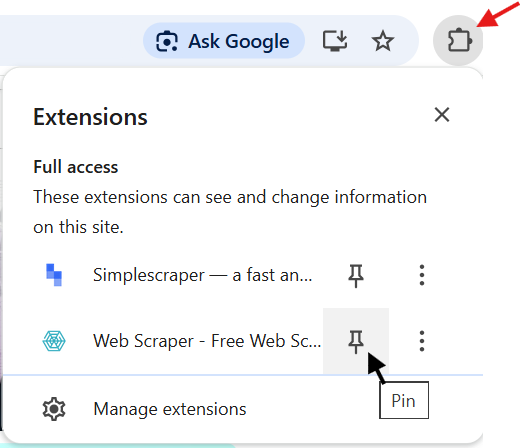
- If the Web Scraper icon does not appear in the Chrome toolbar, select the Extensions icon (shown by the red arrow below) and then select Pin for the Web Scraper extension.